Use the map
Search the sky and read object cards
Search moves you from a name in a book or a chat message to a calculated position on the sky you have set up.
Search for a target
Open search with the magnifying-glass button or press /, then type at least two characters. Search covers named stars, Messier objects, NGC and IC objects, constellations, the Sun, Moon, planets and the major meteor showers included in the app. Pick a result with the pointer or the keyboard.
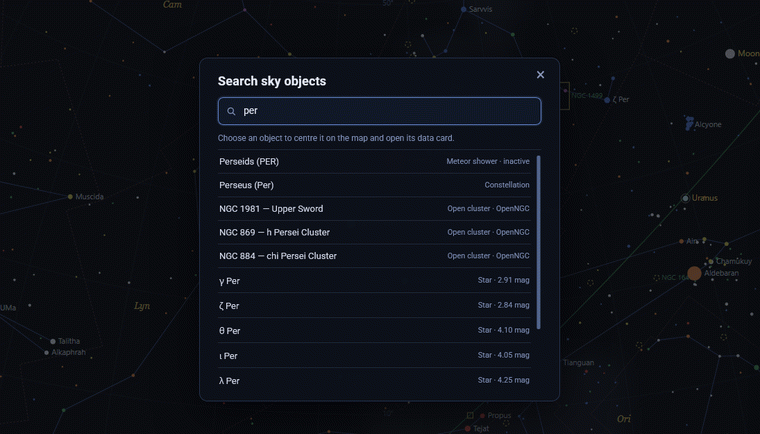
What selection does
Selecting a result centres the map on the calculated position and opens the object’s card. You can also select objects directly on the map. The card describes the current calculated view; it is not a live telescope feed.
Preview an object on the map
On a desktop or laptop, pause the pointer briefly over a star or deep-sky object to open a small label above it. The label shows the object name and available catalogue identifiers; for stars it can also show apparent magnitude. Move the pointer away to dismiss it, or select the information icon in the label to open the full data card. This preview is meant for quick identification while you explore, while the object card remains the place for complete details and calculated local coordinates.
What object cards show
- Stars can show catalogue identifiers, magnitude, coordinates, local altitude and azimuth, spectral type, distance and motion where available.
- Deep-sky objects can show class, magnitude, angular size, position angle and current position.
- Sun, Moon and planets show calculated position, distance and angular diameter; the Moon card adds illumination and phase.
- Constellations and meteor showers give the reference position and the relevant catalogue information.
A search result is at its most helpful after you set the observer location and date and time. Read the full object-card guide when you want to interpret its data.
Names and catalogues
Many objects have more than one recognised name. Search accepts common names when the local catalogue carries them, alongside systematic designations such as M 31 or NGC 7000. Catalogue names remain valuable because they are less ambiguous across languages and publications.