Plan and save
Today: your local sky briefing
Today brings the day’s most useful astronomical conditions together in one compact panel, based on the location and date selected on the map.
Open Today
Select the sunrise-and-horizon icon in the top bar, or open Astronomy tools with the telescope icon and choose Today: local sky guide. Today temporarily replaces the active panel, so you can scan local sky conditions without losing your map view. Select the close button, or press Escape, to return to the panel you were using.
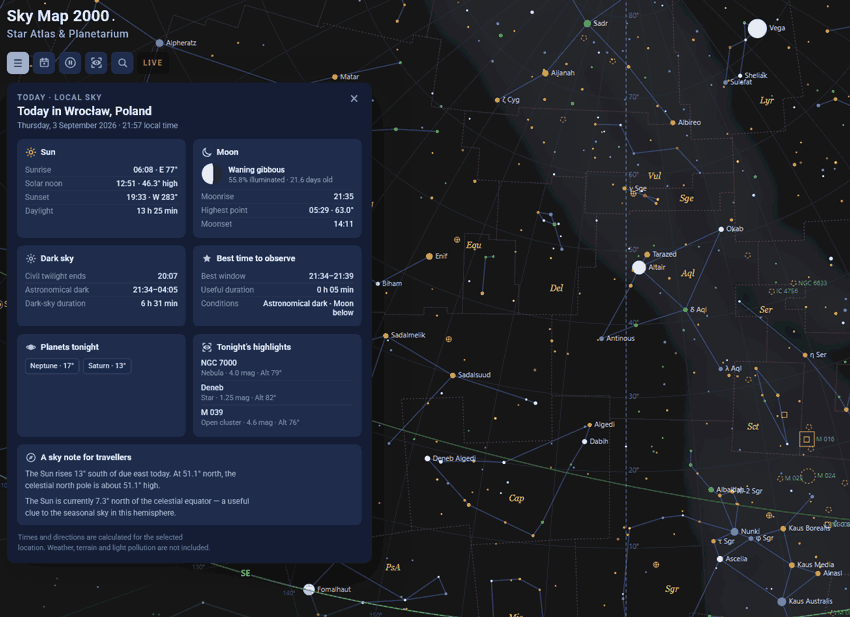
What Today shows
The panel is arranged as a practical daily snapshot. It includes:
- Sun: sunrise, sunset and the length of daylight.
- Moon: phase, illumination and relevant rise and set times.
- Dark sky: the beginning and end of astronomical darkness, with twilight context.
- Best time to observe: a useful Moon-free dark-sky window when the selected day provides one.
- Planets tonight: a compact list of planets that are favourably placed for the evening.
- Tonight’s highlights: a small selection of targets and phenomena worth checking on the map.
Use it as the first step
Today is designed for orientation, rather than a complete observing plan. Start here to understand whether the evening is likely to be bright, Moonlit or properly dark. Then open the Observation Planner for a target-by-target shortlist, or use search to inspect a specific object.
Useful when you travel
Change the observer location before opening Today to compare daylight, twilight, Moon conditions and the useful observing window between destinations. This is especially helpful when a short trip gives you only one or two evenings under unfamiliar skies.