Use the map
Set your observer location
Your location is not a cosmetic setting. It fixes the horizon, the direction of every target and which half of the celestial sphere is above you right now.
Why the same sky looks different
Earth’s rotation carries the sky across every observer’s horizon, but latitude changes the angle at which that sky is presented. A star that is circumpolar from one place may never rise from another. Longitude and the selected time together decide which part of the sky faces you now.
For a working outdoor view, use Horizontal mode after setting your site. Altitude tells you how high an object sits above the horizon; azimuth tells you the direction around it. Those numbers are only meaningful when the location is right.
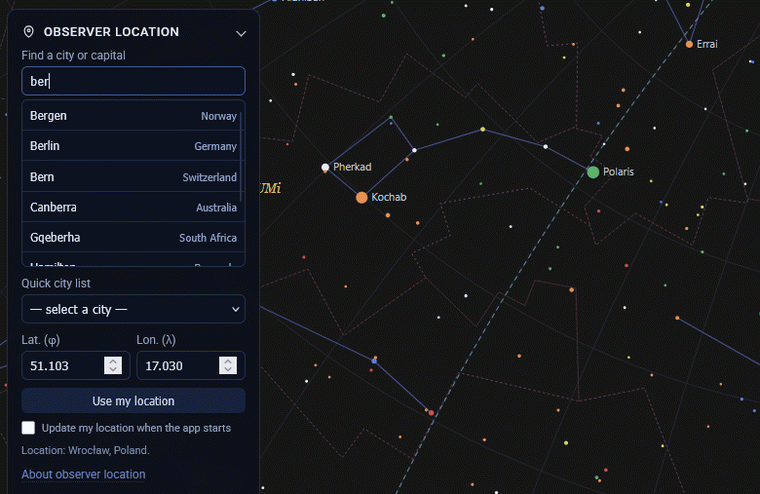
Choose a location method
-
Select a city
Use the quick list or type at least two characters in the city search. The catalogue ships with the application, so what you type stays in the browser and is not sent to a location-search service.
-
Enter coordinates
For a garden, campsite or observatory, enter latitude and longitude directly. Decimal degrees are accepted. North and east are positive; south and west are negative.
-
Use device location
Select Use my location if you want the browser to request the device position. The browser asks for permission, and the feature requires HTTPS outside local development.
With the observing site set, choose the intended date and time, use Horizontal coordinates for an outdoor view, align it with the device compass, or open the observation planner.
What is saved
Your most recent deliberate city, coordinates or device location can be kept in your own browser so the next visit starts from a familiar place. The optional setting to update from the device on start-up is off by default. Clearing this site’s browser data clears these preferences.
If location does not work
Check that your browser has permission to use location and that the site is served over HTTPS. If permission is denied or the device cannot get a fix, you can still pick a city or type coordinates. Sky Map 2000 keeps every path open, rather than requiring device GPS.